CUDA
What is CUDA?
CUDA (Compute Unified Device Architecture) is NVIDIA's platform for running general-purpose code on the GPU instead of just the CPU. It's the layer PyTorch, TensorFlow, and JAX use under the hood. Think of it as the bridge between your program and the GPU.
Why CUDA?
GPUs were built for graphics, but they turned out to be great at doing the same operation on thousands of data points at once — perfect for AI, simulations, and image/video processing.
CPU vs GPU
- CPU: few powerful cores, sequential, low latency, good for logic-heavy code
- GPU: thousands of lightweight cores, massively parallel, high throughput, good for matrix/vector math
CPU                  GPU
         vs
1+5                  Thread 1 → 1+5
2+6                  Thread 2 → 2+6
3+7                  Thread 3 → 3+7
4+8                  Thread 4 → 4+8
(one after other)    (all at once)
GPUs aren't universally faster — only for highly parallel workloads.
Host (CPU) vs Device (GPU)
Host = manager: allocates memory, launches kernels, collects results. Device = worker: runs the kernel across thousands of threads.
Host (CPU) → Launch Kernel → Device (GPU) → Return Result → Host
Memory: separate spaces
CPU RAM and GPU VRAM are separate — the GPU can't touch CPU RAM directly, so data moves via cudaMemcpy(). PCIe transfers are slow, so minimizing them is a key optimization.
CPU RAM → cudaMemcpy() → GPU VRAM → run kernel → cudaMemcpy() → CPU RAM
CUDA Kernel
A kernel is a function that runs on the GPU. __global__ marks it as GPU-executable, launched from the CPU.
void add(...)             // CPU function
__global__ void add(...)  // CUDA kernel
One kernel, thousands of threads run it simultaneously — this is the SIMT (Single Instruction, Multiple Threads) model. You write the logic for *one* thread; CUDA replicates it across the grid.
for(i=0;i<1000000;i++) C[i]=A[i]+B[i];   // CPU loop

Thread 0 → C[0]
Thread 1 → C[1]
...
Thread 999999 → C[999999]                 // GPU: one thread per element
Execution Hierarchy: Grid → Block → Thread
Grid
 └── Block
       ├── Thread
       ├── Thread
└── Thread- Thread — smallest unit, runs one copy of the kernel
- Block — group of threads scheduled onto one SM; can share memory and sync
- Grid — all blocks in one kernel launch
CUDA schedules blocks, not individual threads — much cheaper to manage. Scheduling every thread individually would be expensive, so CUDA schedules a whole 256-thread block onto an SM as a single unit instead.
Blocks and Grids
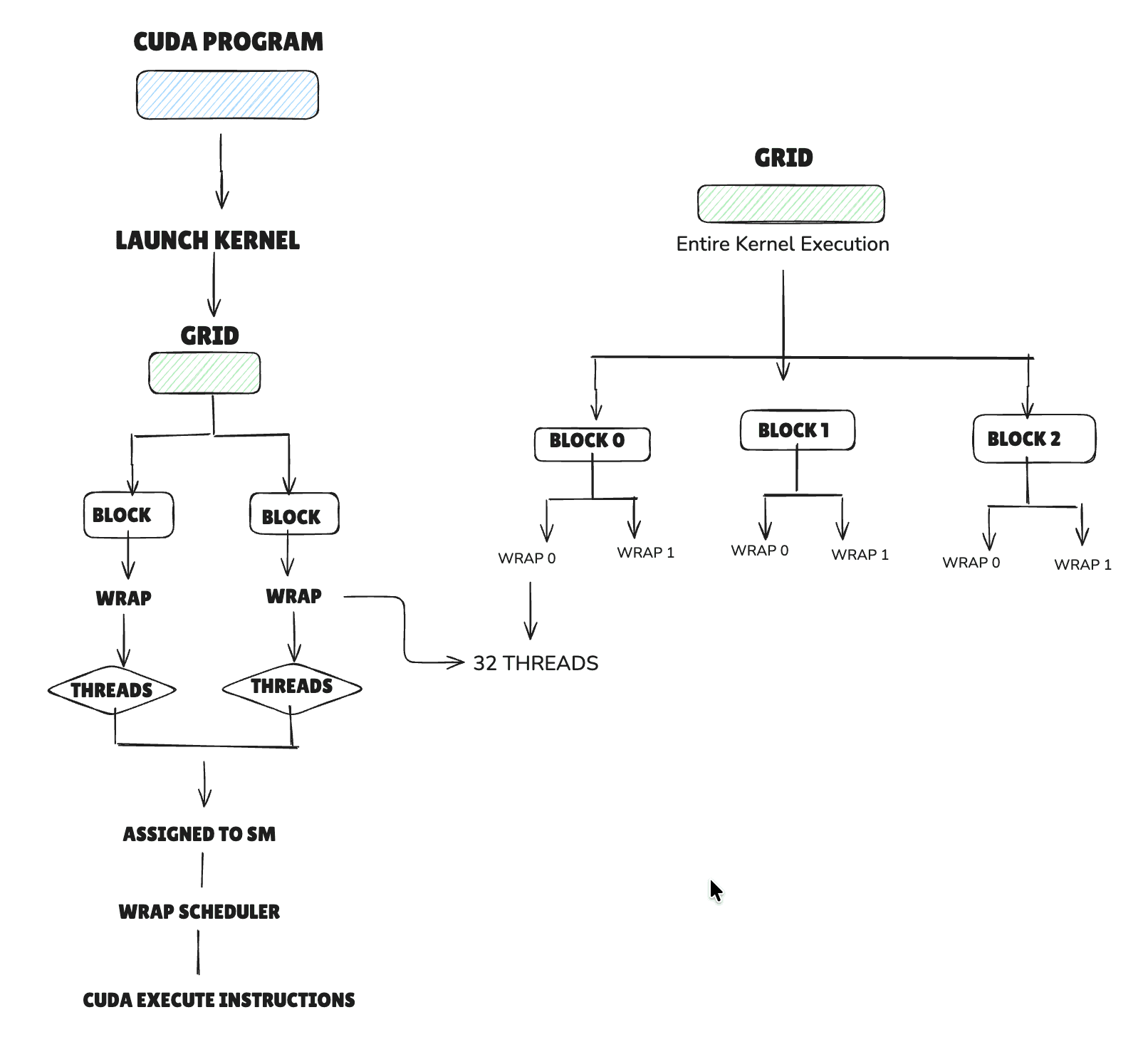
Say a kernel needs 10,000 threads. The GPU doesn't track each one individually — that would be way too much bookkeeping. Instead, CUDA groups threads into blocks, and groups blocks into a grid.
Grid
 ├── Block 0
 │    ├── Thread 0
 │    ├── Thread 1
 │    └── Thread 2
 ├── Block 1
 │    ├── Thread 0
 │    └── Thread 1
 └── Block 2
      └── Thread 0
Notice thread indices restart at 0 in every block — threadIdx is local to a block, not global. To get a unique index across the whole grid, a kernel computes it as blockIdx.x * blockDim.x + threadIdx.x.
Warp
A warp is a group of 32 CUDA threads that execute the same instruction at the same time on an NVIDIA GPU. Instead of scheduling each thread individually, the GPU schedules one warp, making execution much more efficient. Think of a warp as the smallest execution unit the GPU scheduler works with.
Block
 │
 ├── Warp 0 (32 Threads)
 │    ├── Thread 0
 │    ├── Thread 1
 │    ├── ...
 │    └── Thread 31
 │
 ├── Warp 1 (32 Threads)
 │    ├── Thread 32
 │    ├── ...
 │    └── Thread 63
 │
 └── Warp 2 (32 Threads)
Warps are the basic scheduling unit of the GPU.
Software vs Hardware
Software (CUDA)    Hardware (GPU)

Grid           →   GPU
Blocks         →   SMs (Streaming Multiprocessors)
Warps          →   Scheduled by Warp Scheduler
Threads        →   CUDA Cores execute instructions
Global Block Scheduler
Say a kernel launches 100 blocks on a GPU with only 8 SMs. There aren't enough SMs to run every block at once, so a hardware scheduler assigns blocks to SMs as they free up.
SM 1 → Block 0
SM 2 → Block 1
SM 3 → Block 2
  ...
SM 8 → Block 7
The moment an SM finishes its block, the scheduler hands it the next one waiting in line — e.g. once SM 1 finishes Block 0, it picks up Block 18:
SM 1 finishes Block 0
        ↓
   SM 1 → Block 18
This repeats — assign, run, finish, reassign — until all 100 blocks have executed. It's why a grid isn't limited to one block per SM: the scheduler just keeps feeding the hardware until the whole grid is done.
Architecture
H100 Anatomy: GPU → GPC → SM (Size Comparison)
The H100 (Hopper architecture) is currently one of the most powerful GPUs for AI. Its compute is organized top-down: GPU → GPC → SM.
H100 GPU
 └── 8 GPCs
└── 132 SMs total (~16-17 SMs per GPC)- SM (Streaming Multiprocessor) — a mini processor inside the GPU; the unit that actually executes a CUDA block
- GPC (Graphics Processing Cluster) — a larger unit containing multiple SMs; the H100 has 8 GPCs, each managing a group of SMs
- HBM3 (High Bandwidth Memory) — instead of ordinary VRAM, modern AI GPUs use HBM3 to feed data to the compute units fast enough to keep them busy
Put together: 1 GPU → 8 GPCs → 132 SMs, all fed by HBM3. Each SM is like a small, independent GPU capable of executing CUDA blocks on its own — 132 of them means 132x the parallel work compared to just one.
Memory Hierarchy
Registers (fastest, per-thread)
  ↓
Shared Memory (fast, per-block)
  ↓
L1 / L2 Cache
  ↓
Global Memory / VRAM (largest, slowest, all threads)
Use shared memory when multiple threads in the same block need the same data — going through global memory every time is far slower. This is why kernels like FlashAttention lean on it heavily.
Synchronization: __syncthreads()
A barrier — every thread in the block must reach it before any thread continues. Needed whenever one thread writes shared memory that another thread reads.
Thread A: write shared memory
            ↓
        __syncthreads()  // wait for everyone
            ↓
Thread B: read shared memory  // safe now
Typical CUDA Workflow
malloc()                      // 1. allocate CPU memory
cudaMalloc()                  // 2. allocate GPU memory
cudaMemcpy()                  // 3. copy CPU → GPU
kernel<<<blocks,threads>>>()  // 4. launch kernel
cudaMemcpy()                  // 5. copy GPU → CPU
cudaFree()                    // 6. free GPU memory
Internally, a launch fans out: grid → split into blocks → scheduler assigns blocks to SMs → each SM runs its threads → memory accessed → results written back.
CUDA in PyTorch
x = x.cuda() triggers cudaMalloc(), cudaMemcpy(), a kernel launch, and synchronization — all automatically. Nearly every PyTorch op compiles down to one or more CUDA kernel launches.
Why It Matters for Inference
Every LLM op — GEMM, self-attention, FlashAttention, LayerNorm, softmax, embedding lookup, activations — is a CUDA kernel. Knowing CUDA is what turns FlashAttention, Tensor Cores, fused kernels, CUDA graphs, and KV cache tricks from magic into mechanics.
Why is CUDA Important for AI?
PyTorch, TensorFlow, and JAX all use CUDA under the hood — it's the layer that makes them fast on GPUs in the first place. The Python API just hides the mechanics already covered above (see "CUDA in PyTorch"): allocation, the CPU→GPU copy, and the kernel launch.
Quick Revision
- CUDA — NVIDIA's GPU programming platform
- Host / Device — CPU / GPU
- Kernel — GPU function, run by thousands of threads at once (
__global__) - SIMT — one kernel written, executed across many threads
- Grid → Block → Thread — execution hierarchy; CUDA schedules blocks
- Registers → Shared → L1/L2 → Global — memory hierarchy, fastest to slowest
- `cudaMemcpy()` — moves data between CPU and GPU (separate memory spaces)
- `__syncthreads()` — barrier for threads within a block
- SM (Streaming Multiprocessor) — the GPU unit that executes CUDA blocks
- GPC (Graphics Processing Cluster) — a higher-level grouping of multiple SMs
- HBM3 (High Bandwidth Memory) — extremely fast GPU memory that feeds data to the compute units
- MNIST — a simple handwritten-digit dataset used to learn and test neural networks
- Benchmarking — measure how fast a program runs
- Profiling — find where time is being spent and identify bottlenecks
- Optimization — improve performance based on profiling results
- Warp — a group of 32 threads that execute together
- Memory Stall — a warp pauses while waiting for data
One-line summary: CUDA lets you write one kernel that the GPU runs across thousands of threads in parallel — the backbone of modern deep learning and inference.